Professional Work Machadao Labs @ NCSU
At NCSU, I contribute to the RabApp (Rapid Access Biosecurity App), developing robust full-stack solutions to modernize disease surveillance and biosecurity data management.
Technical Growth & Adaptability
Prior to joining Machado Labs, I had zero prior experience with Java, Spring Boot, TypeScript, or Angular. Within just a couple of months, I successfully pivoted from my previous background to mastering this enterprise-grade stack. I taught myself the complexities of dependency injection, reactive state management, and cloud-first architecture to deliver production-ready features for RabApp on a highly accelerated timeline.
Role & Responsibilities
- Managed complex data pipelines, importing Python-processed Parquet files into SQL databases.
- implemented portions of the Disease Surveillance subsection of the platform.
- Enforced rigorous data access controls aligned with company hierarchy restrictions.
- Worked with peers to refactor on-the-fly PDF generation using Thymeleaf contexts for dynamic reports.
- Engineered and migrated database schemas using DBeaver and custom Python scripts.
- Orchestrated local development environments using a Docker stack to mirror AWS production.
- Optimized performance by identifying and fixing memory leaks in the ASF page using profiling tools.
Key Technologies
Workflow & Tools
I utilize a professional suite of tools to ensure high-quality software delivery: Postman for API testing, IntelliJ/VS Code for development, and Jira/Confluence/Figma for agile collaboration and design alignment.
Visuals & Code Snippets
Preview of the Disease Surveillance module interface.
Code Snippet: Dynamic PDF Generation
    /**
     * Processes a single InformationPlan (question/answer) item, extracts the answer,
     * performs necessary formatting, and sets the result into the Thymeleaf context.
     *
     * @param pdfDataRow The object containing the question and answer data.
     * @param context The Thymeleaf context to set variables in.
     */
    public boolean tryPopulateThymeleafContextWithAnswer(PdfDataRowProjection pdfDataRow, final Context context) {
        JsonNode answerNode = this.inputTypeService.safelyParseJson(pdfDataRow.getAnswerJson());
        final SPSQuestion.QuestionMultipartType questionType = pdfDataRow.getQuestionType();
        final String questionShortName = pdfDataRow.getQuestionShortName();
        boolean success = switch (questionType) {
            case MULTI_CHECKBOX -> populateMultiCheckboxAnswer(answerNode, questionShortName, context);
            case TABLE -> populateTableAnswer(answerNode, questionShortName, context);
            case SINGLE_ANSWER -> {
                if (answerNode == null) {
                    LOG.error("Failed to populate SINGLE_ANSWER for question: {}. Answer node is null.", questionShortName);
                    context.setVariable(questionShortName, "N/A");
                    yield false;
                }
                context.setVariable(questionShortName, answerNode.textValue());
                yield true;
            }
        };
        if(!success) return false;
        if (questionType == SPSQuestion.QuestionMultipartType.SINGLE_ANSWER) {
            String singleAnswerText = "";

            if (Objects.requireNonNull(answerNode).isTextual()) {
                singleAnswerText = answerNode.textValue().trim();
            }
            // formatting
            String formattedAnswer = this.inputTypeService.formatAnswerForEmptyOrPhoneNaive(questionShortName, singleAnswerText);
            context.setVariable(questionShortName, formattedAnswer);
        }
        return true;
    }

    private boolean populateMultiCheckboxAnswer(JsonNode answerNode, String questionShortName, Context context)
    {
        try
        {
            // MULTI_CHECKBOX should always be an array of strings
            if (answerNode != null && answerNode.isArray()) {
                List selectedOptions = new ArrayList<>();
                for (JsonNode node : answerNode) {
                    if (node.isTextual()) {
                        selectedOptions.add(node.textValue());
                    } else {
                        throw new RuntimeException(
                                "Unexpected JSON type in MULTI_CHECKBOX for '" + questionShortName +
                                        "'. Expected array of strings but encountered: " + node.getNodeType() +
                                        " → " + node
                        );
                    }
                }
                context.setVariable(questionShortName, selectedOptions);
            }
        } catch (Exception e) {
        LOG.error("Failed to parse TABLE JSON array for {}: {}", questionShortName, e.getMessage());
        context.setVariable(questionShortName, Collections.emptyList());
        return false;
        }
        return true;
    }

    private boolean populateTableAnswer(JsonNode answerNode, String questionShortName, Context context)
    {
        try
        {
            List> tableData = new ArrayList<>();
            if (answerNode != null && answerNode.isArray()) {
                for (JsonNode rowNode : answerNode) {
                    // Each row must be an object: { key: value }
                    if (!rowNode.isObject()) continue;
                    Map row = new LinkedHashMap<>();
                    for (Map.Entry field : rowNode.properties()) {
                        JsonNode value = field.getValue();

                        if (value.isNull()) {
                            row.put(field.getKey(), "");
                        } else if (value.isValueNode()) {
                            row.put(field.getKey(), value.textValue());
                        } else {
                            row.put(field.getKey(), value.toString());
                        }
                    }
                    tableData.add(row);
                }
            }
            context.setVariable(questionShortName , tableData);

        } catch (Exception e) {
            LOG.error("Failed to parse TABLE JSON for {}: {}", questionShortName, e.getMessage());
            context.setVariable(questionShortName, Collections.emptyList());
            return false;
        }
        return true;
    }
Example of using Thymeleaf contexts for on-the-fly document generation.
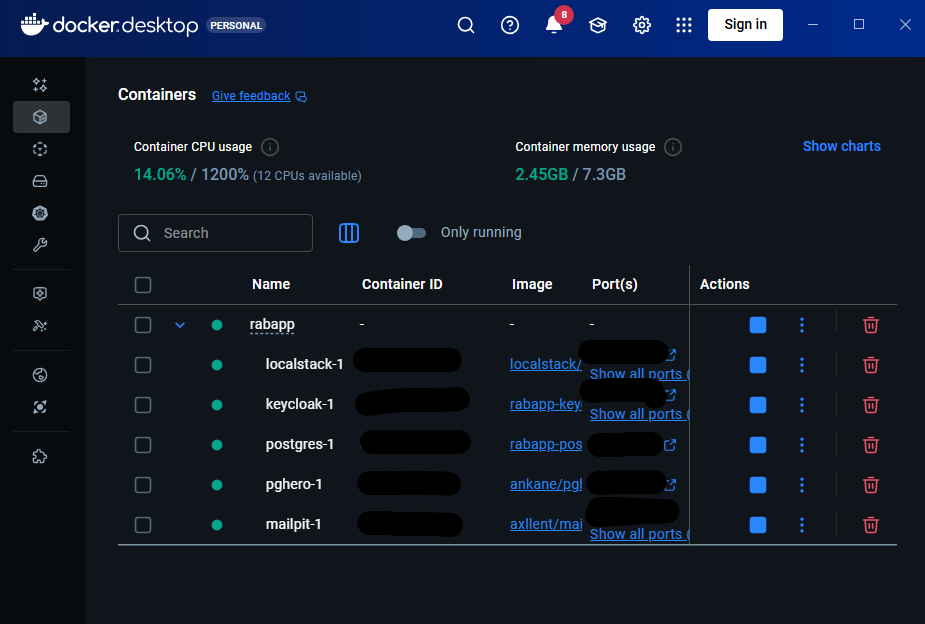
The local stack I used for development with: Spring Boot API, Angular frontend, and PostgreSQL.